Shadcn Feature Block Twelve
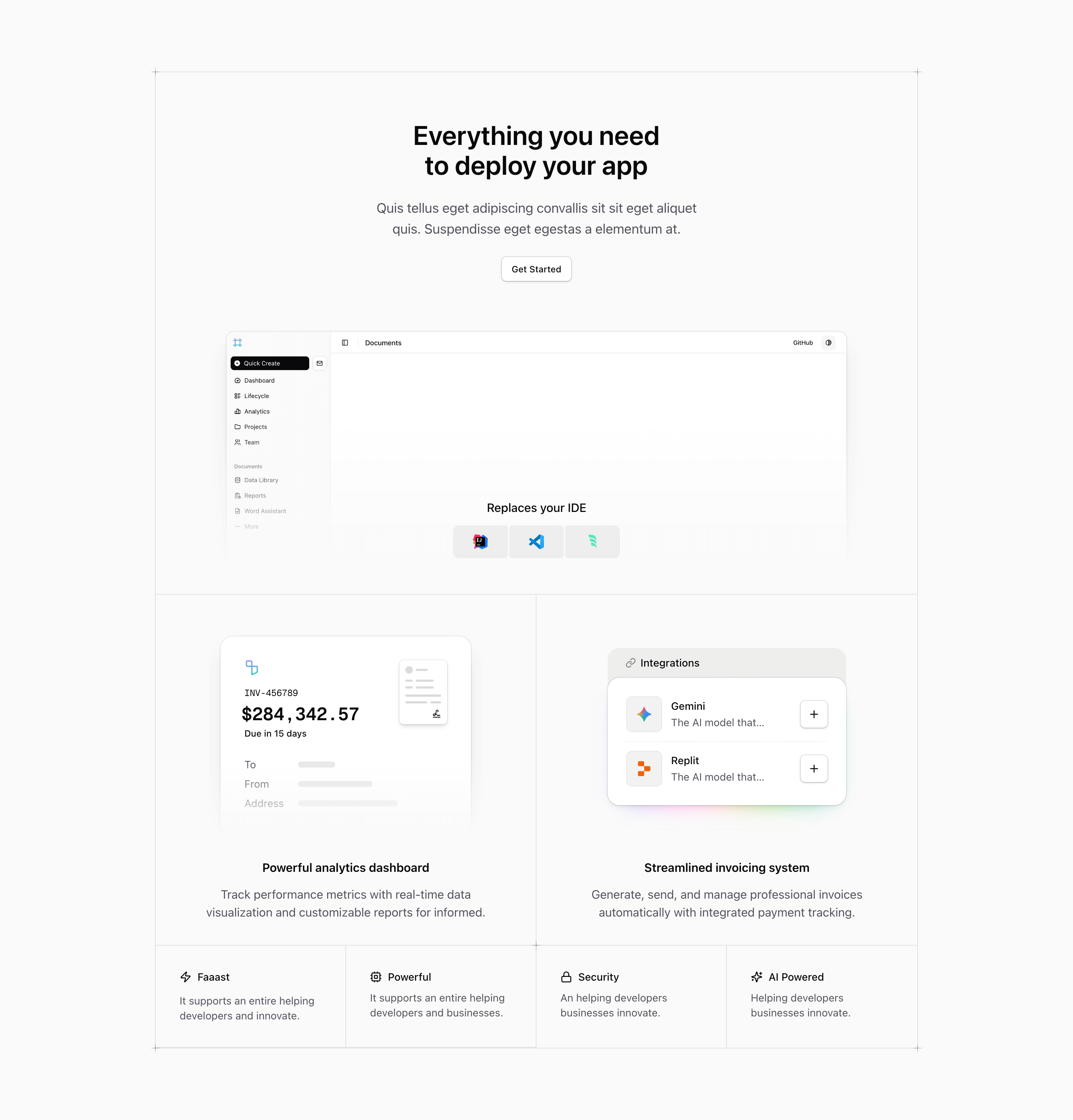
Shadcn Feature Block Twelve is the most page-like feature section in this group. It starts with a centered pitch, Everything you need to deploy your app, adds a small Get Started button that links to /pricing, then drops into a masked product screenshot with IDE badges floating over the bottom edge.
Below that lead area, the same bordered grid pattern from block eleven expands into invoice, integrations, and four compact capability cells. The result is closer to a complete landing page slice than a simple feature row: headline, CTA, screenshot, compatibility proof, and supporting product modules all live inside one shadcn UI block.
The hero-inside-a-grid idea
The first cell spans the full grid. It behaves like a mini hero with a large heading, paragraph, CTA, and screenshot. The screenshot uses next/image with a remote Tailark asset, framed by border, ring, rounded corners, and a shadow. A mask-b-from-35% wrapper fades the visual so it does not overpower the rest of the feature grid.
The IDE strip is positioned absolutely over the screenshot area and labels the block as Replaces your IDE, with IntelliJ IDEA, Visual Studio Code, and Windsurf icons underneath. If your product does not replace an editor, this is the first copy to change.
Source copy that needs attention
The body paragraph under the main heading is lorem-style placeholder copy. The analytics sentence also ends abruptly: customizable reports for informed. The smaller support items repeat the same awkward phrasing used in adjacent variants. This article should be treated as layout guidance, not proof that those claims are final product messaging.
For a production Next.js landing page, rewrite the opening paragraph around the actual deployment workflow, connect the CTA to a real signup or pricing path, and replace the screenshot with a product image that matches the feature claims.
Implementation details from the source
- The section uses
@containerand a max-widthmax-w-5xlwrapper withxl:px-0. - The grid starts at two columns and becomes
@3xl:grid-cols-4, with nth-child border utilities controlling the internal rules. - The screenshot uses
Imagefromnext/imageand a remote asset fromraw.githubusercontent.com/tailark/assets. Buttonis renderedasChild, wrapping a Next.jsLinkto/pricing.- The grid uses the same local
InvoiceIllustration,IntegrationsIllustration, andPlusDecoratorpattern as block eleven.
Where this variant works
Use block twelve when a feature section needs to do more than list capabilities. It is well suited to SaaS launch pages, deployment platforms, developer tools, and product pages that want a CTA and screenshot before diving into secondary features.
Frequently asked questions
Is Shadcn Feature Block Twelve responsive?
Yes. The grid uses Tailwind CSS container-query classes and detailed border rules so the full-width lead area, large panels, and smaller cells rearrange cleanly.
Can I remove the pricing link?
Yes. The Get Started button is just a Tailark core Button wrapping a Next.js Link. Point it to onboarding, contact sales, docs, or remove it if the section should stay informational.
What should replace the placeholder paragraph?
Describe the specific workflow the screenshot supports. For example: deploy previews, connect repositories, manage environments, invite teams, or monitor releases.
Is this a good fit for small marketing pages?
It can be, but it is visually dense. Use it when you need one substantial product section, not when the page already has several heavy screenshots nearby.
Related Shadcn UI blocks
Start from Tailark
Build with Tailark Pro
Tailark Pro brings together essential marketing pages, blocks, and illustrations — designed to help you launch faster without compromising design.
Get AccessLearn More